
THE ONLINE PHOTO STUDIO
Travel Scrapbook Video Maker
Turn a trip into a travel scrapbook video with postcard frames, warm paper and a travel stamp. Upload 5–8 photos from one outing or destination, add a place and date, and arrange a short travel recap video that ends with the whole collection together.
- 5–8 photos
- 10–15 seconds
- MP4 video export
03 / PAPER THEMES
Find the paper for your story.
One collection, three paper moods. Choose a theme, then make it your own.
Explore the library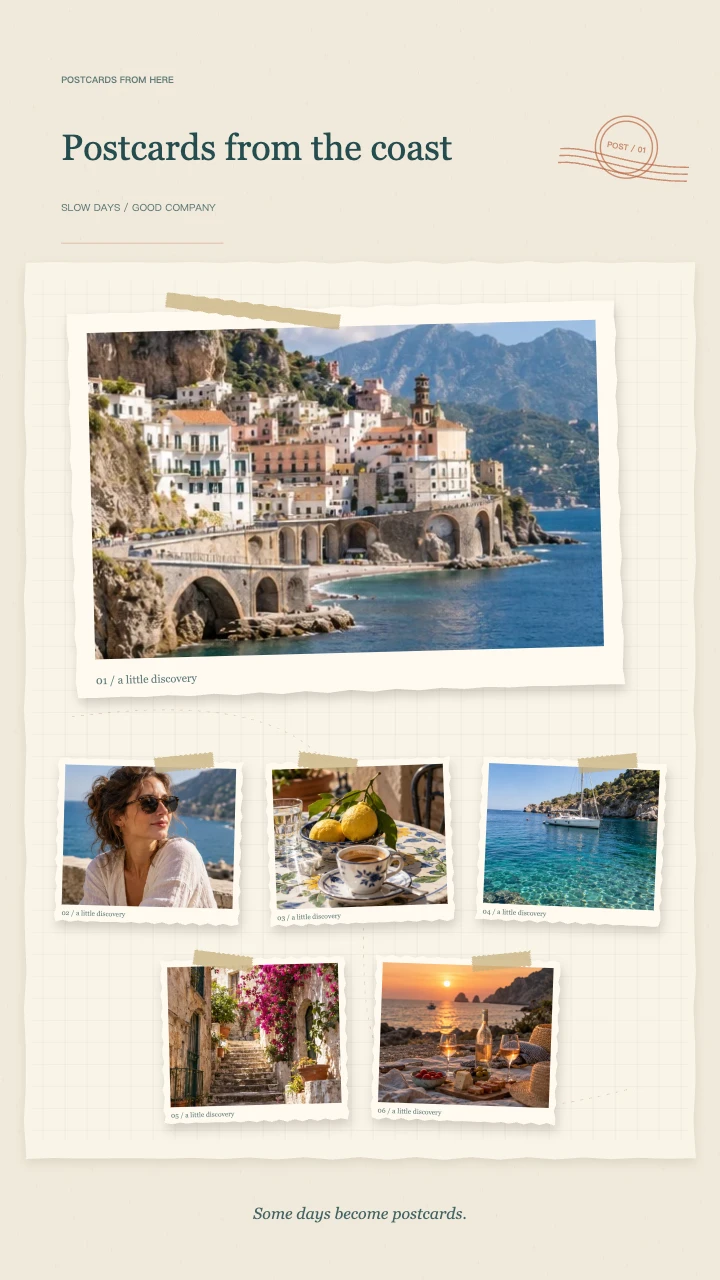
Travel journal
A wide postcard, layered snapshots and travel-journal details for the places you want to remember.
Open template
Birthday wishes
A portrait in the spotlight, favorite memories around it and a little confetti to celebrate.
Open template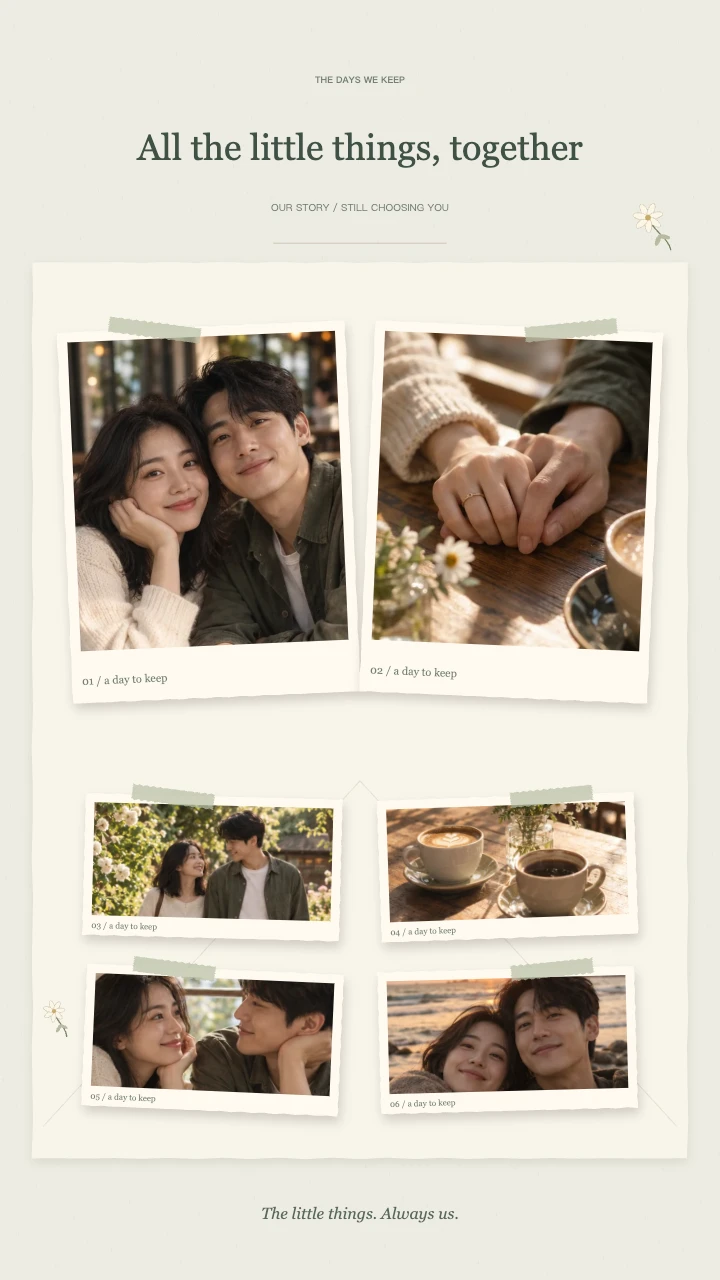
Our little story
Two keepsake prints, soft botanical details and a slower unfolding of your shared days.
Open templateAI-generated demo photos · fictional people and scenes · replace with your photos
Plan a travel scrapbook video with six photos
Begin with a wide view that establishes the destination: a coastline, station, street or mountain. Follow it with a person in the place, a close-up detail and an everyday moment such as a meal or market visit. Finish the collection with the memory you most want to keep.
A travel scrapbook video does not need six different landmarks. A mix of scenery and ordinary moments gives the viewer context. Avoid near-identical images: in a 10–15 second sequence, each picture should add something the previous one did not.
Keep horizons and faces inside the frame
Landscape photos work well for places, while portraits keep people visible in a vertical recap. The generator fits both into paper cards. Select a photo and adjust its focus if a horizon, face or sign falls too close to an edge.
Use 9:16 for a vertical trip recap, square for a compact memory post or 16:9 for an opening in a longer travel edit. Check the moving cards as well as the final collage after changing the canvas.
Give your travel scrapbook video a simple title
Use a title such as A Weekend by the Sea, Three Days in Kyoto or Our First Road Trip. Put a location, month or short note in the second field. A brief title leaves more room for the pictures and makes the recap readable on a phone.
This travel scrapbook template opens with the Travel Journal theme selected. You can change to another theme inside the editor without buying a separate template. The optional melody adds a gentle rhythm; you can also export silently and add music later.
Export your travel photo collage as MP4
Preview the full travel scrapbook video for free. When the order and crops look right, sign in and export 720p for 1 credit or 1080p for 2 credits. The duration can be 10, 12 or 15 seconds at 30fps.
Your travel scrapbook video is a short photo recap rather than a long travel film. For narration, route maps or mixed video clips, import the MP4 into another editor. Finished exports stay in My Files for 90 days, so download the trip video to keep a permanent copy.
Build a travel scrapbook video around one outing
A travel scrapbook video can focus on a single afternoon rather than an entire holiday. Choose a short walk, a day by the sea or the journey to a favorite place. This gives the viewer a clear beginning and ending without asking a handful of photos to summarize several unrelated destinations.
For a longer trip, make one travel scrapbook video for each chapter you want to remember. Keep the selection focused on its own location or mood. The same template can hold an urban weekend or a quiet countryside visit; your photographs, not an automatically generated itinerary, tell viewers where you went.
Use details to personalize a travel scrapbook video
The most personal travel scrapbook video may include pictures that never appeared in a public trip album. A breakfast table, a window view or a friend's shoes after a long walk can explain the day without another landmark. Place these quieter images between wider scenes so the sequence has visual variety.
Review your travel scrapbook video with someone who knows the trip, if possible. Ask whether the images feel connected rather than whether every destination is included. If a small detail becomes unreadable inside its paper card, choose a closer original or adjust its crop before adding more text to explain it.
Choose the pace of your travel scrapbook video
A 10-second travel scrapbook video makes a compact opening for a longer recap. The 12-second option gives the grouped entrances more breathing room, while 15 seconds creates a calmer viewing pace. Preview the actual photos at each duration; a busy street scene can need more attention than a simple coastal view.
The travel scrapbook video template does not synchronize cuts to an uploaded song. Use the optional original instrumental melody or leave the export silent for later editing. If you add narration elsewhere, keep the spoken message short enough that it does not race ahead of the pictures you chose to show.
Check your travel scrapbook video before sharing
Watch the downloaded travel scrapbook video once from beginning to end. Check the place name, dates, horizon lines and whether every person you intended to include remains visible. The finished MP4 is the file your recipient sees, so review it rather than relying only on a paused editor preview.
A travel scrapbook video may reveal private information in the source photos. Look for addresses, readable documents or people who have not agreed to public sharing. Replace a sensitive photo before exporting. Keep a local copy with your trip pictures, because a short account storage period is not a permanent holiday archive.
FAQ
A few things worth knowing.
The details on your photos, free previews and finished videos.
Which photos work best in a travel scrapbook video?
Mix one establishing view, people, details and a memorable closing image. Use 5–8 photos from a connected trip or outing and avoid repeating the same scene several times.
Can I add a destination and travel dates?
Yes. Put the trip name in the title and the destination or dates in the note field. Both are part of the rendered video.
Does the template create a route map?
No. The current travel theme uses paper frames, tape and a travel stamp. It does not generate a map, locate your photos or add real travel tickets.
How much does a travel recap export cost?
Editing and preview are free without an account. Sign in to export: 720p costs 1 credit and 1080p costs 2 credits. The tool uses your existing account balance; there is no separate first-export allowance. Failed or cancelled exports release reserved credits. Download the finished MP4 to keep a local copy.
Your next memory, on paper.
Bring 5–8 photos. Start with a free preview.