
Old paper effect
Turn your photo into an aged print.
Try an old paper effect. Compare three paper finishes, then make your own print.
Make your own printFree PNG export · No sign-in required
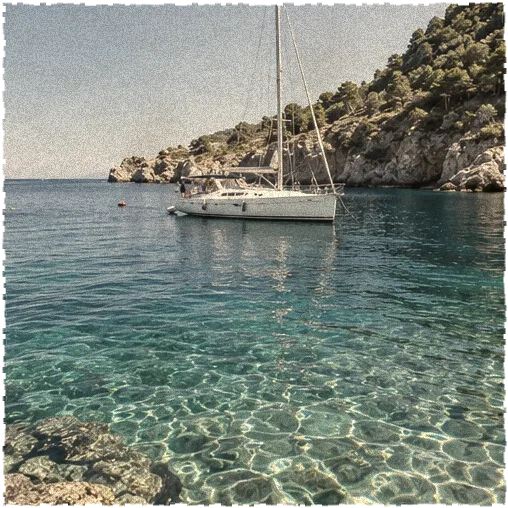
Drag across the photograph to compare
Time, in different amounts.
Compare a real old paper effect with the same original photograph. Choose a lighter aged print, a warmer yellowed surface or a more worn treatment. These examples use the old paper effect controls in the workbench, rather than replacing your picture with an unrelated vintage image.

An afternoon portrait
A little fade. A familiar face.
Use this old paper look · Portrait
Light on the coast
A softer tone. A warmer surface.
Use this old paper look · Coast
A table, remembered
Texture, creases and time.
Use this old paper look · Still lifeControl your old paper effect
Make a photo feel like a handled print. An old paper effect adds yellowing, fading, stains and worn edges, with separate controls for each. Compare your old paper effect with the original, then save a free PNG.

Start with the aging amount
The old paper effect uses an overall aging control alongside more specific settings. It gives you a starting point for the treatment instead of forcing one distressed look onto every photo. Begin with a small amount, compare the original and add character gradually. An old paper effect should support the story of the image; it does not need to make every surface heavily stained or every color brown.
Balance yellowing and fading
Yellowing changes the color impression of an old paper effect, while fading reduces the freshness of the photograph. These controls have different jobs. A lightly faded image does not always need a warm yellow cast, and a warm print can still retain useful color. Tune the old paper effect while looking at skin, whites and important text, where an excessive shift is easy to spot. Keep a copy of the source for comparison.
Place wear in context
Stains and edge wear make the old paper effect more visibly distressed. Strong settings can work in an expressive collage but may distract in a portrait or an informational graphic. Compare the whole composition at its final display size. The old paper effect uses controlled variation rather than a new generated photograph, so your scene remains the same while the surface treatment changes. Use the variation control only when you want another arrangement.
Choose the surrounding background
Your old paper effect can be exported with transparency or a solid background. Transparency is useful when worn edges should sit over another paper or design; a solid surface gives you a complete ready-to-place image. Check those worn regions against the real destination. An old paper effect that reads clearly over a light background may disappear into a busy dark pattern, so make that decision before saving the final file.
Build an old paper effect
Choose a clear source
Import one picture into the old paper effect workbench or start with the example. Use JPG, PNG or WebP, within the supported upload limits. For your old paper effect, choose a source whose important details are already legible. Distressing can reduce clarity, so it is better to begin with a strong image than to expect the aging process to repair blur, a small file or an awkward composition.
Build the treatment gradually
Set the old paper effect aging amount, then adjust yellowing, fading, stains and wear separately. Compare against the original as you work. If the picture becomes difficult to read, reduce the most obvious treatment rather than adding more contrast everywhere. A different old paper effect variation can change the arrangement of the material, but a good starting point is usually less aging and fewer stains than the strongest available settings.
Save the finished print
Choose a transparent or solid output background and download the old paper effect as a free PNG. No account or credit payment is required for this image mode. Use the old paper effect in a design editor, a presentation or a larger collage. The exported pixels already contain the aging, so retain your source image if you may want a cleaner treatment or a different version later.
Give an old paper effect a role
Memory collages
An old paper effect can help a personal photo sit among paper scraps, handwritten notes or keepsake-style graphics. Choose restrained yellowing when the photograph still needs to look like a recent memory rather than a historical artifact. The old paper effect creates a visual treatment, not a verified date or provenance. Avoid presenting the processed image as an authentic archival print when that would mislead the audience.
Poster backgrounds
Apply an old paper effect to a finished artwork or background that needs a weathered character. Keep small typography away from heavy stains, and inspect fine lines after fading. An old paper effect works best when the rest of the poster supports its material choices. A contemporary headline can contrast with aged paper, but mixing several unrelated distressed treatments can make the design harder to read.
Storytelling slides
Use an old paper effect on a photograph in a personal or editorial presentation when the surface contributes to the narrative. Leave enough clean space for captions and supporting information in your slide editor. One old paper effect image can establish an atmosphere without processing every slide. Keep the unedited source available whenever historical accuracy, documentation or a faithful representation of the original photo is important.
Export your old paper effect
- PNG
- Free export. No sign-in.
- 4096 px
- Maximum longest edge
The old paper effect creates a static PNG. It does not animate aging, generate a video or restore an existing damaged photograph. A paper-toned background and worn edges belong to the visual treatment. The old paper effect preserves supported output resolution, scaling proportionally above a 4096-pixel longest edge or 12 megapixels.
Choose transparency for an old paper effect that will be layered over another surface. The preview checkerboard is not part of the downloaded picture. A solid output includes your selected background color. Your old paper effect is a flattened image, not a layered PSD with independently removable stains, fading and edge damage.
Preview and download of an old paper effect are free without signing in. Compare the final treatment with the original and review the displayed output dimensions before exporting. If the old paper effect is only one part of a composition, use a PNG-friendly design editor to arrange it with text and other images afterward.
Before you start
What does an old paper effect add?
An old paper effect gives an image a paper-aged appearance through yellowing, fading, stains and edge wear. You can adjust those aspects instead of accepting a single fixed filter. It is a visual style for photos and artwork. It does not establish that a photograph is old, and it is not a tool for restoring damaged source material.
Is the old paper effect free?
Yes. The old paper effect preview and PNG export are free without an account or credits. You can compare the original and refine the treatment before downloading. Paid MP4 rules apply to the separate animation modes in the workbench. This page produces a still image and does not require a paid video export to save it.
Can I make it subtle?
Yes. Start the old paper effect with a low aging amount, then keep stains and wear restrained. Yellowing and fading have separate controls, so the result does not need to be uniformly brown or heavily damaged. Compare the photo at its intended viewing size, especially around faces and text, and keep a clean copy of the source image.
Can I keep the background transparent?
Choose transparent output for an old paper effect with alpha in its empty or worn regions. You can then layer the PNG onto another surface. The checkerboard is only a preview convention. If you want the complete image to carry its own background, choose a solid output and check that color before downloading the processed picture.
Does this restore an old photograph?
No. An old paper effect deliberately adds the appearance of age to an uploaded image. Restoration would aim to remove scratches, repair damage or recover missing detail. Those are different operations. Begin with a usable source photo, and keep an untouched version if accuracy or preservation of the original image is important to your project.
Can I use a modern color photo?
Yes. The old paper effect can be applied to a supported color photo as well as artwork that already has a muted palette. Adjust fading and yellowing while looking at the original colors. A lighter treatment can retain much of the photograph’s identity. Stronger aging may suit a deliberate collage, but it is not automatically more convincing.
Will the stains change when I adjust fading?
Your old paper effect keeps its variation seed while you change ordinary settings. The explicit new-variation control changes the material arrangement. This helps you refine color and distress without constantly replacing the pattern. Preview and export use the same selection, so the downloaded PNG should reflect the version you reviewed in the workbench.
Can I export an aging animation?
This old paper effect page exports a static PNG, not an MP4 of the image gradually aging. You can place the finished picture in a video editor if needed. The separate paper animation modes create their own types of motion, such as unfolding or crumpling; they do not turn the aging sliders into a new aging timeline.
Make this photo your own.
Give an old paper effect just enough age to tell your story. Compare the clean source, choose the wear deliberately, and save an old paper effect PNG for your next layout.