
THE ONLINE PHOTO STUDIO
Photo Collage Video Maker
Use this photo collage video maker to animate 5–8 pictures in your browser. Choose their order, frame each subject and add a title. Your photos appear in small groups, then come together in one final composition. The current style is a paper scrapbook, with travel, birthday and anniversary themes.
- 5–8 photos
- 10–15 seconds
- MP4 video export
03 / PAPER THEMES
Find the paper for your story.
One collection, three paper moods. Choose a theme, then make it your own.
Explore the library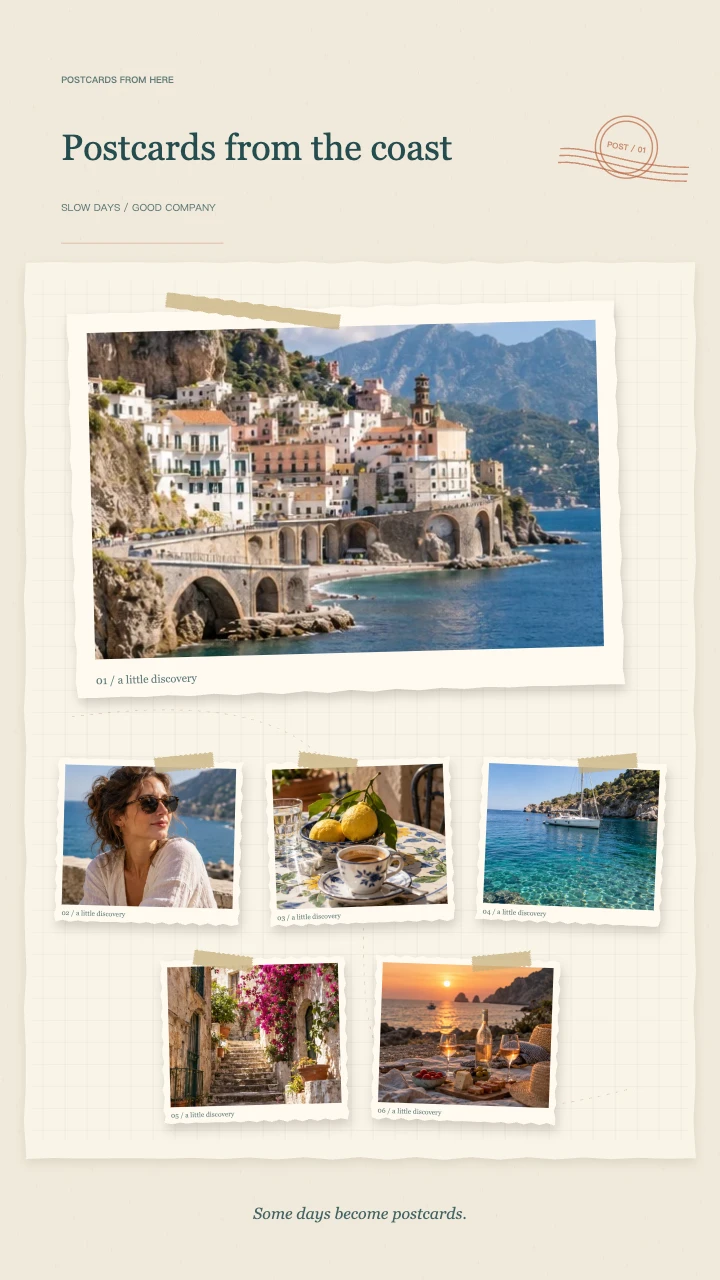
Travel journal
A wide postcard, layered snapshots and travel-journal details for the places you want to remember.
Open template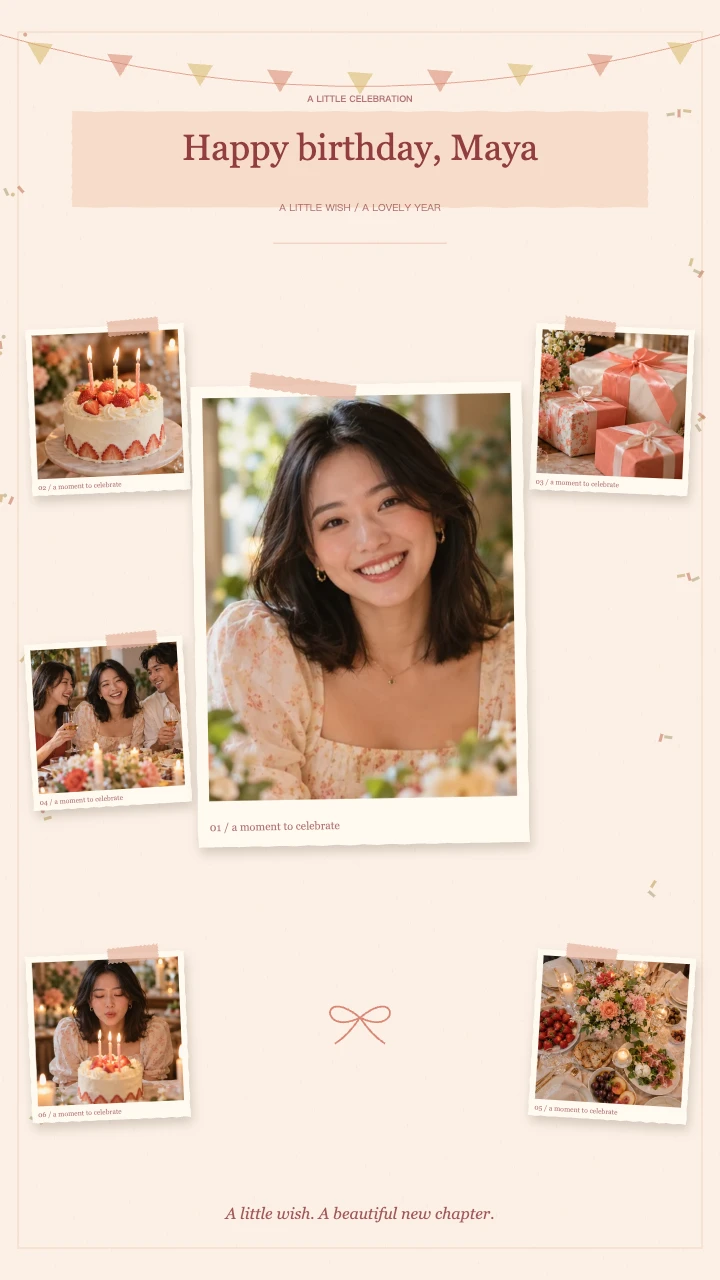
Birthday wishes
A portrait in the spotlight, favorite memories around it and a little confetti to celebrate.
Open template
Our little story
Two keepsake prints, soft botanical details and a slower unfolding of your shared days.
Open templateAI-generated demo photos · fictional people and scenes · replace with your photos
Turn a set of photos into one collage video
This photo collage video maker builds a short sequence rather than a single still grid. Pictures enter as framed cards, paper reveals connect the groups, and the ending holds the complete arrangement. Choose 10, 12 or 15 seconds depending on how much time each picture needs.
Use five photos for a focused sequence with fewer subjects, or up to eight when the details matter. The same image keeps its own crop when you change the order. Add a place, date or short line of text to make the finished video understandable without a long caption.
Choose your photo collage video maker canvas
Start with 9:16 for a vertical post, 1:1 for a square composition or 16:9 for a landscape video. The layout changes with the canvas; photos are not stretched to fill a different shape. Check faces and important objects in the moving preview as well as in the ending.
The photo collage video maker accepts portrait and landscape pictures in one project. Open each thumbnail to adjust horizontal focus, vertical focus and zoom. A little space around the subject makes the paper frame easier to work with than a tightly cropped source image.
A focused alternative to a full timeline editor
You choose the photos and theme; the photo collage video maker supplies the timing and arrangement. There are no layers or keyframes to manage. This is useful when you need a short photo story before adding captions, voice-over or a larger edit elsewhere.
This version accepts JPG, PNG and WebP photos, up to 10 MB each. It does not accept video clips, provide a multi-track timeline or automatically cut to an uploaded song. If you need a photo and video collage maker for mixed clips, finish that combination in your usual editor after exporting this photo sequence.
Photo collage video maker: export sizes and credit costs
The photo collage video maker outputs a 30fps H.264 MP4. Preview the whole sequence before spending credits. A 720p export costs 1 credit; a 1080p export costs 2 credits. Both resolutions use the same composition and can include the optional original synthesized melody.
Encoding happens on your device, so support and speed depend on the browser and hardware. If 1080p cannot be encoded, try 720p. The source photos stay in your browser; the finished video and thumbnail are saved to My Files for 90 days when you complete an export.
Prepare pictures for the photo collage video maker
Before opening the photo collage video maker, collect pictures that share a subject, outing or occasion. Choose one clear opening image, several supporting details and a closing memory. Variety matters more than filling every available slot: a wide view, a portrait and a close detail tell different parts of the story.
The photo collage video maker cannot restore missing detail in a blurry source. Prefer the original file over a screenshot from a messaging app. If a face already touches the edge, select a wider alternative; the paper frame and animated entrances need some space around the subject.
Review motion in the photo collage video maker
A useful photo collage video maker preview shows more than the final grid. Watch the opening, each pair of incoming cards and the ending at normal speed. A title may be readable while paused but need less text when the sequence is playing. Shorten the wording before changing the photos.
Use the photo collage video maker to compare a calm 15-second sequence with a quicker 10-second version. Neither choice changes the number of pictures. Choose the pace that lets viewers recognize the important subjects, and keep the closing composition on screen long enough to understand the collection.
Use your photo collage video maker export elsewhere
Download the photo collage video maker result before preparing a post or longer edit. The MP4 can become an opening memory sequence, a compact visual message or a closing recap. If you plan to add narration, leave the optional melody disabled and combine the file with your audio in another editor.
The photo collage video maker handles the photo sequence, not publishing permissions or music licensing. Use pictures you have permission to share, especially when other people appear. Review the downloaded file with sound enabled before sending it, and keep a separate local copy rather than relying on account storage indefinitely.
FAQ
A few things worth knowing.
The details on your photos, free previews and finished videos.
How do I use the photo collage video maker online?
Upload 5–8 photos, choose a theme and canvas, arrange the order, and adjust each crop. Add your title and note, play the preview, then sign in and export an MP4 with credits.
Can I mix portrait and landscape photos?
Yes. Each picture is fitted to a frame without stretching. Use its focus and zoom controls to keep the subject visible, and review the entire animation before exporting.
Is this a free photo collage video maker?
Editing and preview are free without an account. Sign in to export: 720p costs 1 credit and 1080p costs 2 credits. The tool uses your existing account balance; there is no separate first-export allowance. Failed or cancelled exports release reserved credits. Download the finished MP4 to keep a local copy.
Can I add video clips or my own song?
The current generator accepts photos only. It includes an optional original melody but does not import your own audio. You can combine the exported MP4 with clips and music in another editor.
Does an animated collage work like a slideshow?
A slideshow typically shows one photo after another. This tool builds grouped paper compositions and finishes with all photos together. It is designed for a short 10–15 second collage rather than a long photo presentation.
Your next memory, on paper.
Bring 5–8 photos. Start with a free preview.