
Make the photo itself bend. A paper fold effect adds a visible crease and changes the folded plane, rather than laying a line over a flat image. Preview your paper fold effect and export a free PNG.
Fold your photoFree PNG export · No sign-in required

Drag across the photograph to compare
Try another photograph
Your print is ready
Make it with your photoFree PNG · No sign-inA fold changes the picture.
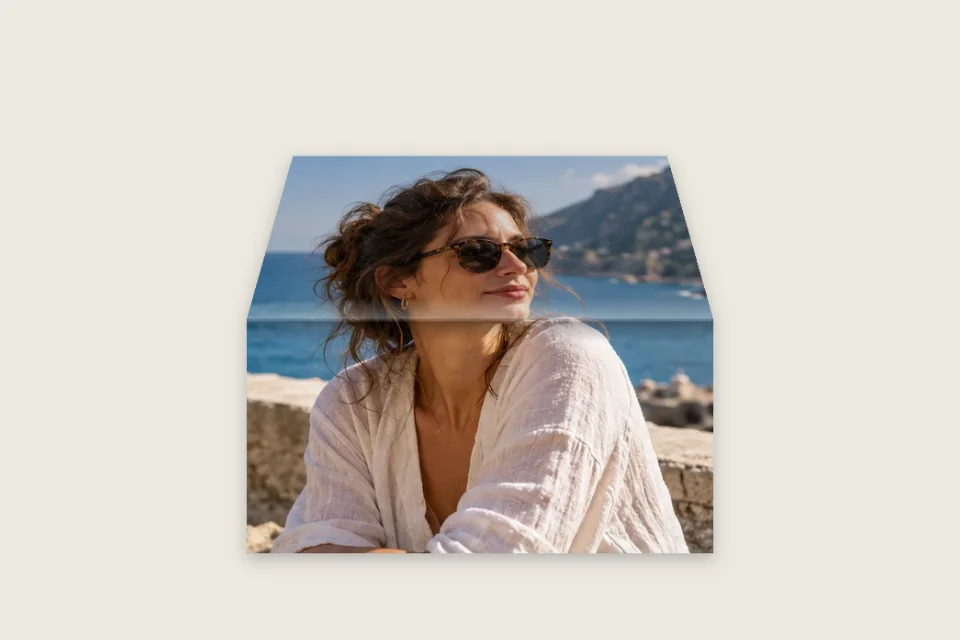
Move the comparison to see a real paper fold effect alter the photo geometry. Try a vertical fold, a horizontal fold or a stronger crease. The paper fold effect compresses the far plane and changes its perspective, with optional shading to help the fold read clearly.
Vertical fold
Horizontal fold

Deeper fold
Shape your paper fold effect

A visible change of shape
The paper fold effect divides the photograph into an unchanged plane and a folded plane. The second plane narrows and changes perspective as you increase the amount. This gives the paper fold effect a geometric foundation: you can still see the difference when the highlights and shadows are reduced. It is a single-fold image treatment, not an origami model or a physically simulated sheet with arbitrary folds.
Place the crease
Choose the horizontal or vertical paper fold effect, then position the crease along the supported range. Moving the hinge changes how much of your photograph belongs to each plane. Keep a face or a word away from the fold if readability matters. A paper fold effect can also deliberately interrupt architectural lines or a landscape horizon, where the deformation makes the crease easier to recognise. Preview both orientations before settling on the composition.
Separate depth from contrast
Fold amount changes the shape of your paper fold effect; shadow and highlight change the impression of light around it. Start with the geometry, then add enough contrast to explain the crease. A paper fold effect does not need a heavy black stripe to look dimensional. On a bright photo, gentler shading may be enough, while a busy photograph can benefit from a clearer distinction between its two planes.
Choose the supporting surface
Export your paper fold effect on transparency when you want to place it onto a larger design. A solid background makes sense when the image itself is the final composition. The paper fold effect leaves room for its transformed plane and shadow, so inspect the displayed output dimensions as well as the photo. Its empty margins are useful space around the result, not a promise that the original rectangular crop stays unchanged.
Build a paper fold effect
- 1
Start with useful lines
Import one photo into the paper fold effect workbench. A building facade, a portrait with open background or a graphic with a clear composition can make the fold easy to judge. Begin with the example if you are unsure how the controls behave. For your own paper fold effect, use a source with enough resolution for the final display size, and decide which part of the picture should remain visually stable.
- 2
Set the hinge and amount
Choose the paper fold effect direction and move its crease position. Increase the fold amount gradually while watching the outer plane compress. Then adjust shadow and highlight to suit the picture. Compare your paper fold effect with the original to check that the result is visibly folded rather than simply darker. If important content feels cramped, move the crease away from it or choose the other orientation.
- 3
Export the static result
Select transparent or solid output, then download the paper fold effect as a free PNG. No sign-in or credits are required for this image tool. Place the exported paper fold effect into a poster, presentation or larger composition. Because the PNG contains the rendered fold, you can move and resize it elsewhere, but the hinge is no longer a separate editable control inside the downloaded file.
Put a paper fold effect to work
Photo treatments
A restrained paper fold effect gives one photograph a tactile change without covering it in distressed texture. It suits a design where the image needs an intentional interruption rather than a decorative frame. Keep the paper fold effect away from a face when recognition is the priority, or use the crease to divide a less sensitive part of the scene. Test the result at its actual placement size.
Graphic compositions
Use a paper fold effect on a finished design with type and strong shapes. Prepare the full artwork as one image before uploading, and place small text on the flatter side. The paper fold effect transforms the picture pixels as a whole; it does not reflow typography or recognise individual design layers. A short title and open margins are easier to fold convincingly than a dense page of fine print.
Printed-memory layouts
Pair a paper fold effect with a neutral scrapbook surface or a simple presentation background. The crease can suggest a handled print without making the photo look old or stained. Avoid combining a strong paper fold effect with several competing folds and borders in the same small area. A single legible plane change often conveys the material more clearly than a collection of unrelated texture treatments.
Export your paper fold effect
- PNG
- Free · No sign-in
- 4096 px
- Maximum longest edge
A paper fold effect exports a static PNG with the visible crease, transformed photo plane and selected lighting. It is not an MP4 animation. The paper fold effect canvas includes space needed for the fold and shadow; native resolution is retained until the 4096-pixel longest-edge or 12-megapixel output cap requires proportional scaling.
Transparent output preserves the empty area around your paper fold effect. The preview checkerboard is not included in the PNG. Choose a solid output color for a self-contained image instead. Downloading a paper fold effect does not create a layered PSD, a three-dimensional mesh or an editable vector design with a movable hinge.
The paper fold effect preview and PNG download are free without an account. Review the displayed size and the readability of the folded plane before saving. If you want paper to open over time, use the separate Unfold animation: the paper fold effect here focuses on the appearance of a folded still image.
Before you start
What is a paper fold effect?
A paper fold effect makes a photo look folded by changing the geometry of one plane and adding optional lighting around its crease. This tool uses a single horizontal or vertical fold. It is designed for a rendered still image, with control over the hinge position and fold amount, rather than for a complex sequence of origami actions.
Is it only a crease texture?
No. The paper fold effect changes the folded part of the image itself, compressing it into a different perspective. The deformation remains visible with the lighting controls reduced. If you only want to apply fibers, grain or wrinkles over a flat photo, the separate paper texture overlay tool is a more direct fit for that task.
Can a paper fold effect be animated?
This paper fold effect page exports PNG images. It does not create a folding video or a timeline between two photos. For a single picture that is revealed by opening paper, use the paper unfolding animation workbench. The two tools share an editing shell but have different controls, intended outcomes and export formats.
Can I move the crease?
Yes. The paper fold effect lets you adjust the crease position within the supported range, along with its horizontal or vertical direction. The amount of folded image changes accordingly. You cannot draw multiple freehand crease paths or create an arbitrary origami object; the control is intended for one clear and readable fold.
Does the result support transparency?
Yes. Export a paper fold effect on transparent output to retain alpha outside the rendered paper. You can then place it over a surface or another picture in a design editor. A solid output background is also available. Check the outer margins and shadow against the destination background before using the image in a final layout.
Is the PNG export free?
Yes. You can preview and download a paper fold effect PNG without signing in or spending credits. Paid video export rules do not apply to this static image mode. The workbench displays the final output dimensions, including any bounds expansion and proportional scaling needed to stay inside the supported image-size limits.
Why does my text look compressed?
The paper fold effect treats your complete upload as one picture, including any text already printed into it. Text on the folded plane narrows with that plane. Move the crease, reduce the fold amount or prepare a composition that keeps small type on the flatter side. The tool cannot reflow or independently edit lettering in a flattened image.
Which photos make the fold easiest to see?
A paper fold effect is easier to evaluate when the picture has clear structural lines, open areas or a subject separated from its background. Very busy texture can hide a subtle crease. Try a stronger amount initially, then reduce it to the level that suits your design. Keep important faces away from the hinge when a natural portrait matters.
Make this photo your own.
Create a paper fold effect with a visible crease and deliberate lighting. Start with one image, adjust the hinge, and take your paper fold effect into a larger design as a PNG.